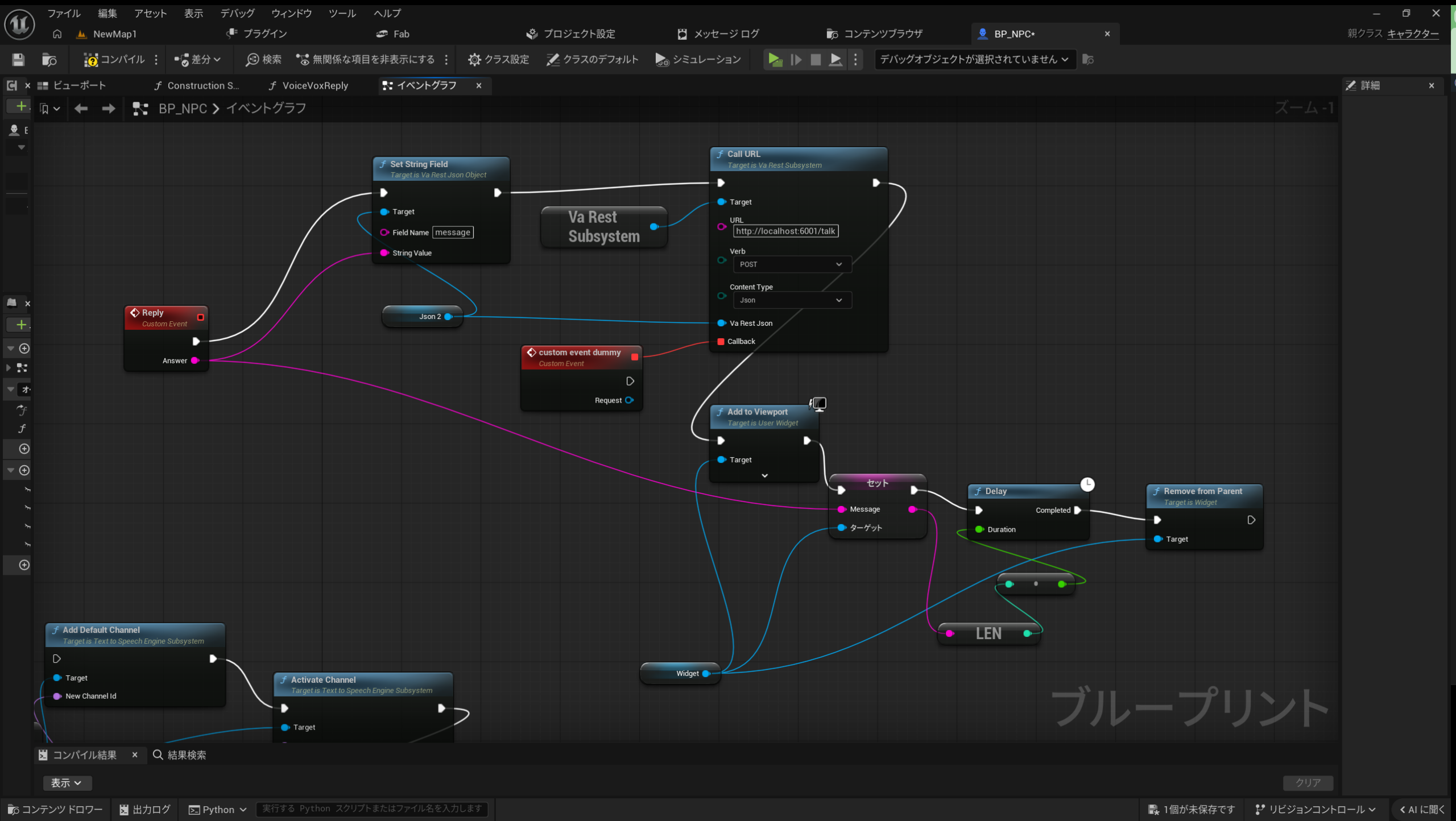
voicevox を立ち上げると rest api サーバー(localhost:50021)が常駐するので、そこへ文字列と話者(ずんだもんとか四国めたんなど)を渡せばその文字列をしゃべらせることができる。unreal から voicevox の rest api サーバーへ varest プラグインを通じて直接アクセスすれば良さそうに思えるのだが、その後 voicevox が生成した wav ファイルを鳴らすという処理も行う必要がある。この部分のこまごまとした作業を blueprint で書くのは難しい。wavファイルをwindowsで再生するというそれだけの単純作業にしても、powershell から呼ぶのが一番安全確実である。
そこで powershell で rest api サーバーを立てて、unreal はそのサーバーにいったんデータを送り、そこから ruby なり python なり別の powershell なりのスクリプトを呼び出して、voicevox の rest api サーバーを間接的に呼び出したり wavファイルを再生するのが一番よかろうということになった。
私は ruby が好きなので、できるだけ ruby で書けるところは ruby で書きたいと思った。python は結局使わずに済んだ。
次の ruby スクリプトはコマンドラインの引数に文字列を渡して voicevox サーバーを呼び出し最終的に powershell スクリプトで voicevox が生成した wavファイルを再生するというものである。
voicevox1.rb
require 'net/http'
require 'uri'
require 'json'

def speak(text, speaker)
  puts text, speaker
  uri = URI.parse("http://localhost:50021/audio_query")
  uri.query = URI.encode_www_form({ "text" => text, "speaker" => speaker })
  headers = {
    "Content-Type" => "application/json",
    "User-Agent" => "vox-client:0.1",
  }
  response = Net::HTTP.post(uri, "", headers)
  case response
  when Net::HTTPSuccess
    result = JSON.parse(response.body)
  else
    puts "audio query error: #{response}"
  end
  uri = URI.parse("http://localhost:50021/synthesis")
  uri.query = URI.encode_www_form({ "speaker" => speaker })
  response = Net::HTTP.post(uri, response.body, headers)
  if response.code == '200'
    File.open("output#{speaker}.wav", "wb") do |f|
      f.write(response.body)
    end
  else
    puts "synthesis response error"
  end
end

query_text = ARGV[0]
speak(query_text, 1)
# powershell で output*.wav を鳴らす
system("powershell -ExecutionPolicy Bypass -command .\\sound1.ps1")
そして次の powershell スクリプト sraserv02.ps1 は unreal から呼び出す rest api サーバーであり、unreal から渡された文字列をその都度 ruby スクリプトに渡すというだけのものである。じゃあ最初から rest api サーバーも ruby で書いてしまえばよかったんじゃないのと思うが、もう動いてしまったのでとりあえず今のところはこれでよしとする。
$port = 6001
$prefix = "http://localhost:$port/"
$text_encoding = [System.Text.Encoding]::UTF8

$listener = New-Object System.Net.HttpListener
$listener.Prefixes.Add($prefix)
$listener.Start()

Write-Host "REST API Server listening on $prefix"
Write-Host "Press Ctrl+C to stop."

try {
  while ($true) {
    $context  = $listener.GetContext()
    $request  = $context.Request
    $response = $context.Response

    $path = $request.Url.AbsolutePath
    $method = $request.HttpMethod

    Write-Host "$method $path"

    $result = $null
    $status = 200

    if ($method -eq "POST" -and $path -eq "/talk") {
      # POST /talk
      # {"message": "string to talk" }
      $reader = New-Object IO.StreamReader($request.InputStream, $text_encoding)
      $body = $reader.ReadToEnd()
      $reader.Close()
      $result = $body | ConvertFrom-Json
    } else {
      $status = 404
      $result = @{ error = "Not found" }
    }

    Write-Host $result.message
    # ruby で voicevox に言葉を送る
    ruby voicevox1.rb $result.message
  }
}
finally {
  $listener.Stop()
  $listener.Close()
}
で、最後はただ単にwavファイルを再生するだけの powershell スクリプト sound1.ps1。
(New-Object Media.SoundPlayer "output1.wav").PlaySync()pardon は unreal 側からまず ollama に質問してその答えを reply に渡す。
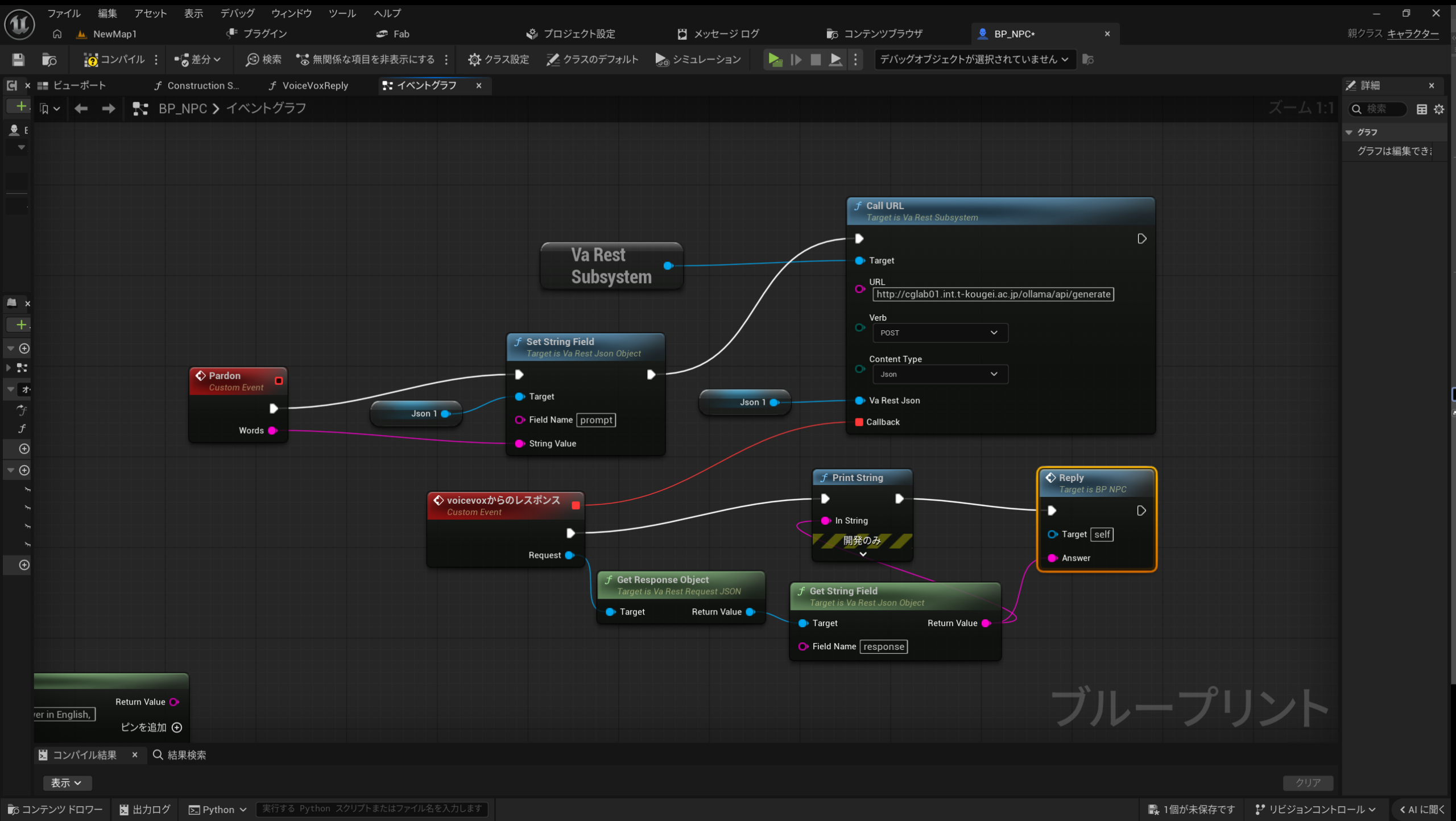
reply は ruby スクリプトで書いた localhost:6001 の rest api サーバーにアクセスして voicevox を喋らせる。